Getting Started
Welcome to Teldaria!
New players may be overwhelmed at the custom content that Teldaria offers, but hopefully this guide will clear things up to make your gameplay as smooth as possible!
This guide is very long, please utilize the table of contents so you don't have to read things you already know!
Tutorial World
When you first log in, you start in the Tutorial world. The first sign you walk past — the one hanging over the Tutorial Lodge — sets out the whole idea:
Welcome to Teldaria! You are in the tutorial area. Right-click NPCs to talk to them! They will provide useful information for your journey.
Nothing in here is forced on you. Two more signs along the path repeat the same promise — "There is plenty of information available to you in this area. Feel free to leave at any moment, and return with /warp Tutorial." — so you can walk out with /spawn the second you get bored and come back later with /warp Tutorial when a system finally confuses you.
Resource Pack
The very first thing you should do is to check if you have the resource pack which can be confirmed by seeing the cheese! If you don't see the resource pack, worry not, just log out of the server really quick and enable prompt
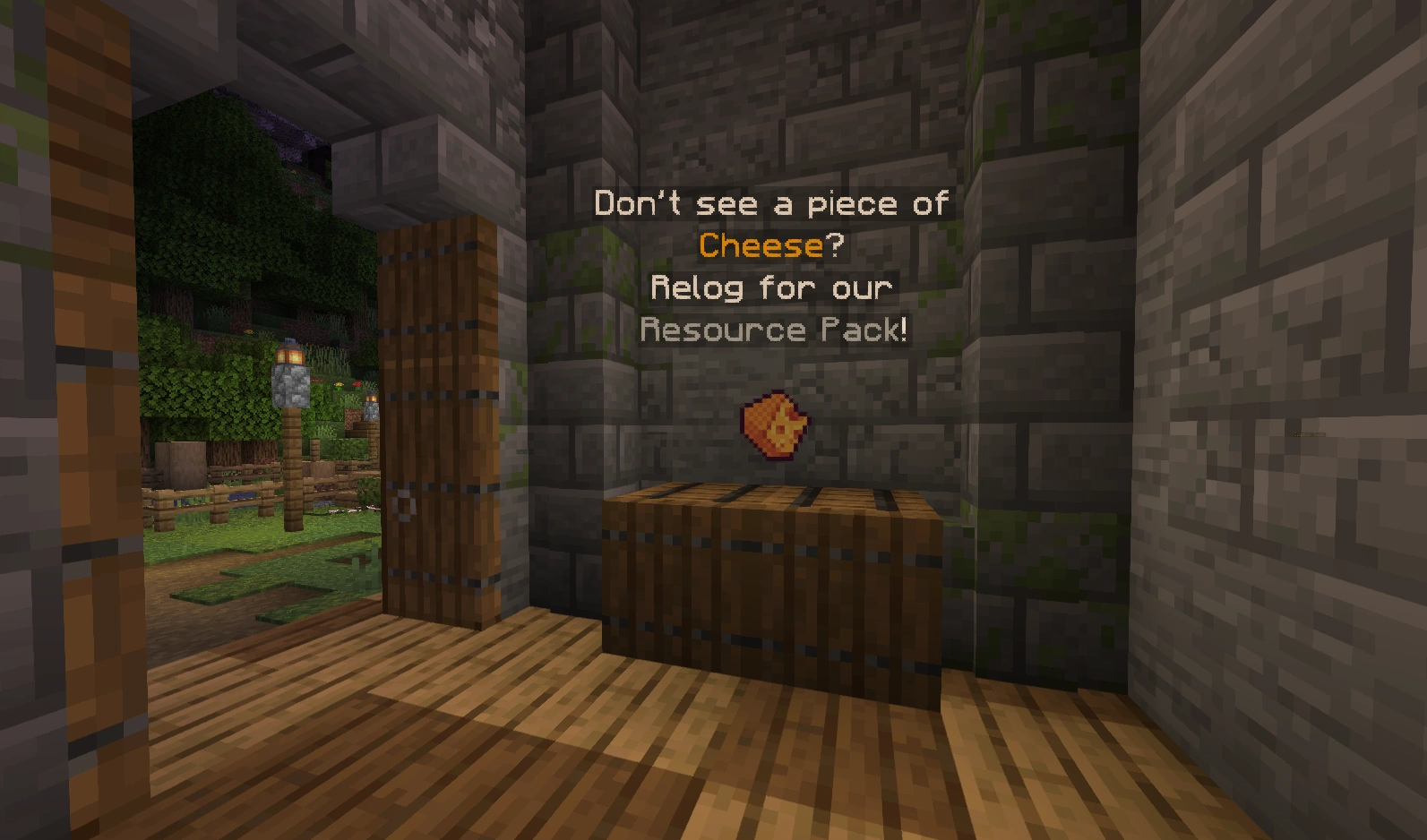
Check if you see this cheese in game, if you don't, then follow the next steps to get the resource pack!
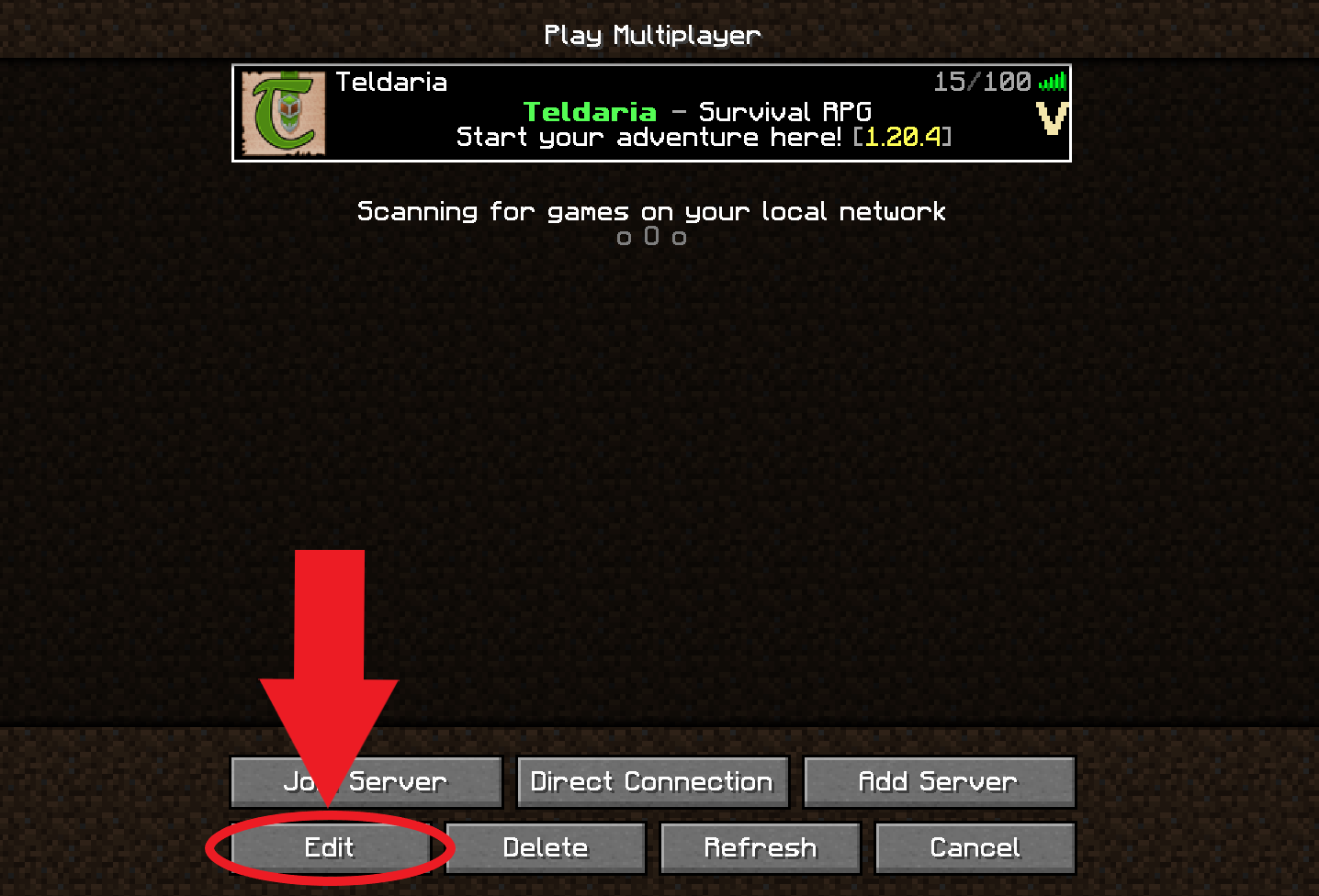
Click the Edit button while having Teldaria selected!
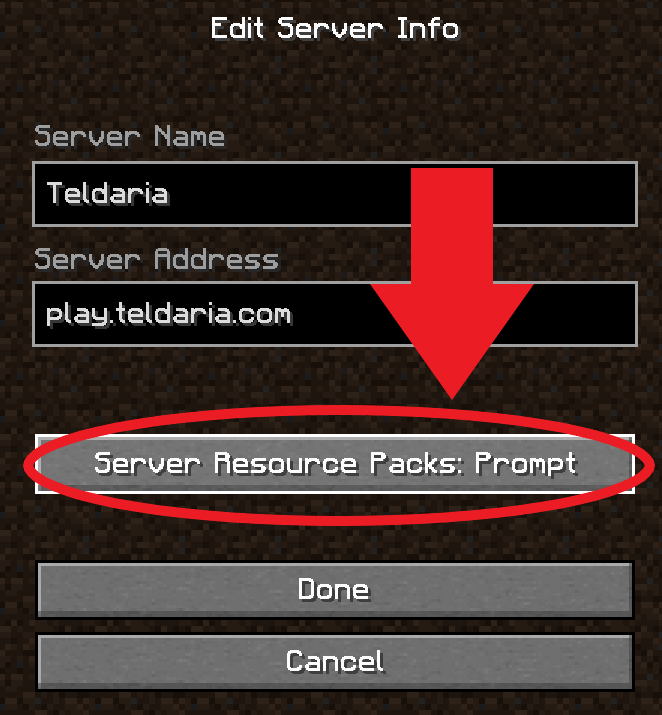
Click the highlighted button until it says Prompt!
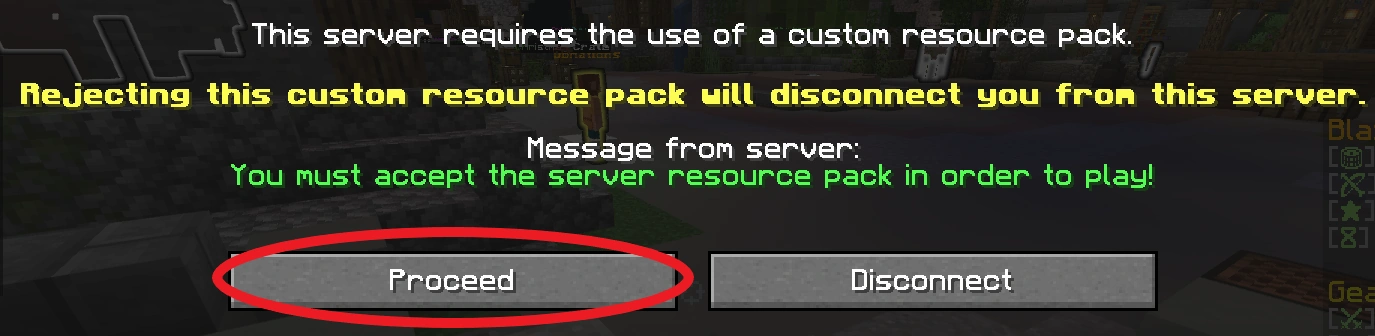
Finally, log in and press Proceed to download the resource pack!
Walking the Path
With the resource pack properly enabled, you can wander the Tutorial world and right-click the NPCs to acquire information at your own pace! The NPCs do the teaching; the floating signs only ever tell you three things:
| Stop | What the Sign Says |
|---|---|
| Tutorial Lodge (the entrance) | Welcome to Teldaria! You are in the tutorial area. Right-click NPCs to talk to them! They will provide useful information for your journey. |
| Twice along the path | There is plenty of information available to you in this area. Feel free to leave at any moment, and return with /warp Tutorial. (The second of the two adds: leave with /spawn**.) |
| The portal at the far end | You have reached the end of the Tutorial. Beyond this portal lies the Teldaria Town Center. Use the command /warp Tutorial if you'd like to return here. |
Between those signs the tutorial is essentially one long display hall. Silent stands hold examples of everything you will spend the next few hundred levels chasing: the three weapon classes below, gems and runes, a backpack, five mob drop reagents, three mob spawners, three cooked foods, a set of gear pieces, a row of cosmetics, and one showpiece weapon off on its own.
The Weapon Stands
Three floating stands in the middle of the tutorial compare weapon classes side by side, each with the weapon hovering at eye height and its stat panel written above it:
| Class | Damage | Attack Speed | AOE Damage | Critical Damage | Lifesteal |
|---|---|---|---|---|---|
| Great Axes | High | Low | High | High | None |
| Swords | Medium | Medium | Medium | Medium | High |
| Daggers | Low | Insane | Low | Low | Medium |
Read that as three answers to the same question. Great Axes hit hardest and hit everything at once, but swing slowly and never heal you. Swords are the middle option and the only one of the three with High lifesteal, which makes them the forgiving pick while your gear is still bad. Daggers trade every other stat away for an attack speed the panel simply calls Insane.
Those are the three classes the tutorial puts on display — Teldaria has more weapon types than this, and Ever Wild lets you try each of them at the Proving Grounds before you commit.
Leaving the Tutorial
Follow the path to its end and step through the portal, which drops you at the Teldaria Town Center. If you would rather skip ahead, /spawn works from anywhere. Either way, /warp Tutorial brings you back whenever you want another look.
Every new player starts here in the Tutorial on first join. Once you leave, head to Ever Wild with /warp EverWild. It is the first dimension to explore, and its quests teach you different parts of the game as you go.
Around Spawn
Spawn is where the rest of the game is bolted together. A row of labelled stations runs along one side of it, each one a service you will use constantly:
| Station | What It Does |
|---|---|
| Crusher | Refine armor, weapons and tools into dust |
| Crafter | Create new gear from crushed essence |
| Teldaria Crates | Earn exclusive, powerful rewards using keys |
| Head Hunter | Obtain custom player heads for home decor |
| Cosmetics | Customize your look and show off your achievements |
| Missions | Complete timed tasks offering great rewards |
The Crusher and Crafter sit a few blocks apart on purpose: they are two halves of one loop, and that loop is how gear progression actually works. See Getting Better Gear below.
The Dimension Portal
Spawn also holds the Teldaria Dimension Portal, a room ringed with seven info boards. Each board is a one-page summary of a whole world, and together they are the clearest statement of Teldaria's progression ladder that exists in game:
| Dimension | Level Required | Recommended Difficulty | Mob Tiers | On Death |
|---|---|---|---|---|
| Wild | 0 | Regular | None | Not listed |
| The Mayan (Mayan) | 0 | Regular | Regular to Tormented | Keep all inventory items |
| The Nether (Nether) | 50 | Forgotten | Forgotten to Fatal | Lose all items not in your hotbar or armor slots |
| The End (End) | 150 | Hellish | Tormented to Legendary | Everything outside your hotbar and armor, plus 3 random hotbar items |
| Forged | 250 | Fatal | Hellish to Heavenly | All Scrap in your inventory — nothing else |
| Frozen Echoes | 350 | Heavenly | Legendary to Transcendent | Lose all items |
| Corrupted Forest | 350 | Heavenly | Legendary to Transcendent | Lose all items |
Exactly two of those boards carry a WARNING: PVP ENABLED line — Forged and the Corrupted Forest. Everything else the boards tell you is flavour worth knowing before you go:
- The Wild is billed as "a peaceful destination for building cities, mining, or farming", and it is the only board that advertises land claiming.
- The Mayan is the starter zone in as many words: "Perfect for new adventurers to begin their journey and upgrade their gear." It is also the only dimension whose board promises you keep everything on death.
- The Nether names its residents — the fire giant Surtr, and the forgotten lair of the Pyromancer.
- The End is where the Ender Dragon's death let an "Ender virus" spread through the dimension's inhabitants.
- Forged states its entire loop on the board: "Collect scrap from this wasteland and trade it for valuable rewards." That trading happens at the Scrap Shop.
- Frozen Echoes is home to the village of Hearth and three monolithic towers locked in a perpetual battle for control — winning the tower fights both rewards you and protects the village.
- The Corrupted Forest shifts its enemy activity between points of interest on a 30-minute cycle (the board still says 15 — it's outdated).
Where a board and the live game disagree, the table above already shows the live rules — a couple of boards are slightly out of date. The Dimensions page is the authoritative reference.
Getting Around Spawn
Spawn is big enough that six Teldaria Quick Warps! signposts are scattered across it — you are rarely far from one. There is also a parkour course with a live top-10 leaderboard board showing each runner's name, time and death count, refreshed every ten seconds. See Warps for the full teleport list.
Setting Up Base
Now that you're in /spawn, that means you are in the Wild dimension, a vanilla Minecraft world. This is where the vast majority of players build their bases. It's difficult to find a base walking from spawn, so try doing /rtp, which will randomly teleport you to somewhere in the world! Now go and find your potential base location!
Claiming
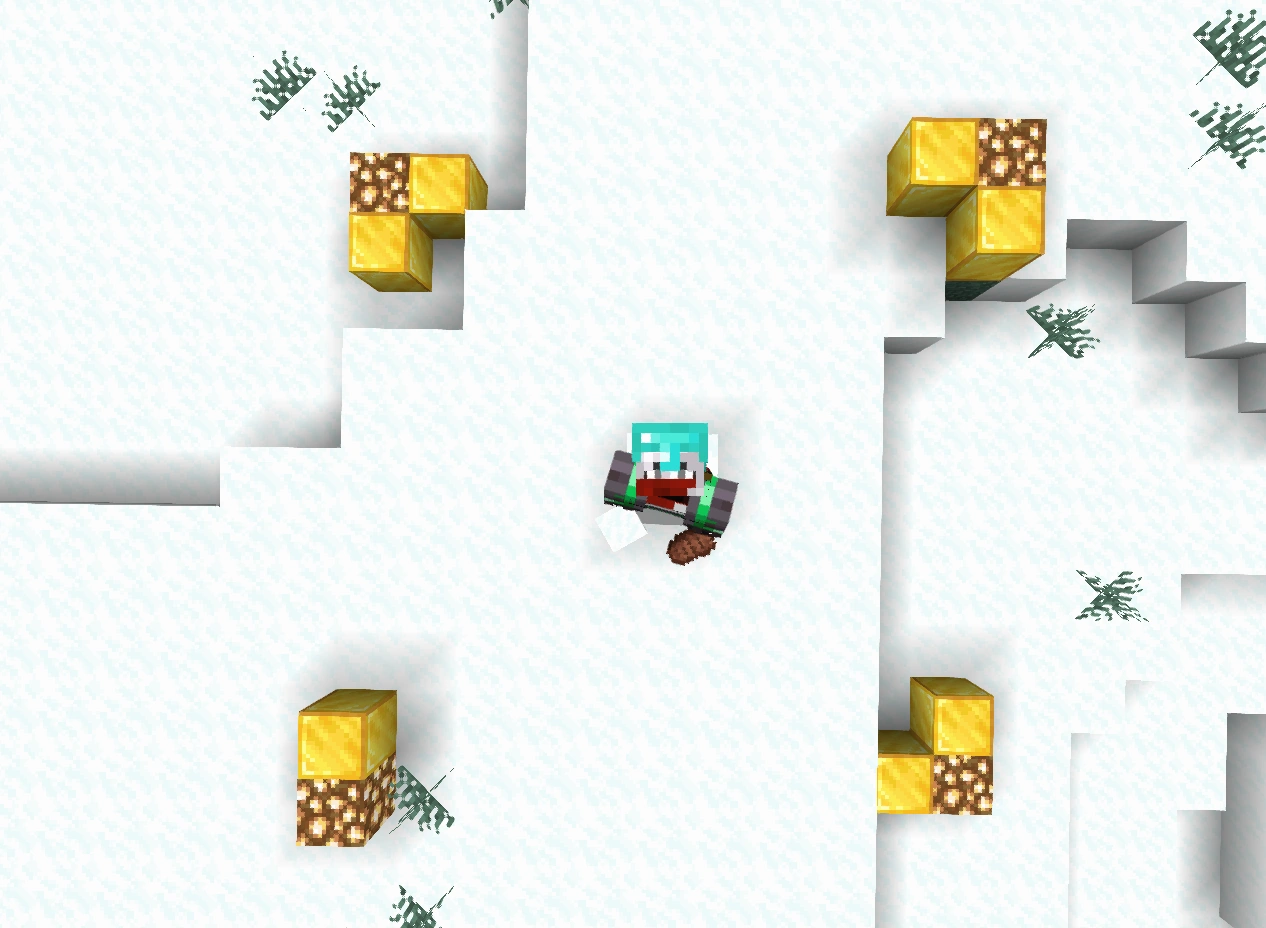
Example of a freshly created claim using /claim, with the corners shown by gold blocks and glowstone.
Claiming through the golden shovel is an important way to claim which land is yours! All of your claimed land is protected so that no one without your permission can open your chests or break/place blocks within your claimed land.
To get started with claiming, the easiest method is to do /claim (number of blocks around you). This will make a square around where you're currently standing, with the borders a certain distance of blocks from you. This is all your claimed land! If you make a mistake you can use the golden shovel from /kit claim, to adjust the corners of this square by right-clicking a corner of the square then right-clicking another block to move that corner.
Claims use up claimblocks, which can be checked with /claimlist, you get more for free up to 10k based on playtime. Alternatively, you can buy more with in-game money using /buyclaimblocks <amount> — run it with no amount to see your balance and the price. /claiminfo tells you about whichever claim you are standing in.
Setting a Home
With your base created, you want to make sure you are able to return. All you have to do is create a home with /sethome (home name). Then, you can teleport back by doing /home (home name). If you forget you can check all your homes with /homes.
Leveling Up and Getting Gear
With a base set up for you to return to stash all your loot. It might be time to begin to level up and collect gear! As a beginner you'll have very weak gear which may be confusing, but that will all be explained later. The most important thing you need to know about gear right now is their tier, which is shown near the top when you hover over it in your inventory. You can compare this in /tiers to see how strong your gear is relatively!
Where to Fight Mobs
At first, you'll only be able to fight lower tiered mobs, which can be found at /warp mayan. The Mayan's own portal board says it plainly — perfect for new adventurers to begin their journey and upgrade their gear — and it is the one place where dying costs you nothing, since you keep all your inventory items. Alternatively you can wander the Wild for random spawning mobs though it can be harder to find mobs this way. As you progress and level, you can unlock harder Dimensions to kill mobs at, like the Nether at level 50.
Leveling Up
You will level up by killing mobs which can be checked with more detail with /level. Every 10 levels, you will acquire a level point you can use to increase a stat by using /levels. Higher levels unlock additional, more difficult content such as Dungeons and Dimensions. The end goal is leveling up to 500, the max level, and prestiging if you are committed.
Getting Better Gear
You will get random custom gear by killing mobs. Early on, this gear will either be as good or better than your current gear until you reach a certain point (around hellish-fatal). The only other way of getting gear without killing a custom mob is right-clicking cloudy bottles to open them to get a random piece of tiered gear.
However, you can still get better gear through crafting using essence and cloudy bottles. This will be the main method of gear progression in the game. Crafting is done at the Crusher and Crafter — /crusher and /crafter, or in person at /warp workshop and the labelled stations at spawn.
- Crush what you don't need. Open the Crusher and throw in all extra and unneeded equipment. This destroys the equipment and gives you essence of that item's tier — normally 1 to 3 per item, with a small chance of a fourth. Badly damaged gear is worth less: anything at 25% durability or below only ever yields 1 essence, so crush your junk before you beat it to pieces. Crafted gear and anything you have locked with /tprotect cannot be crushed at all.
- Turn essence into a bottle. Once you have enough essence of the same tier, grab a normal glass bottle and open the Crafter. Every recipe is essence + 1 glass bottle, but the essence cost climbs with the tier — 4 at the bottom, 6 in the middle, 8 for everything from Hellish upward.
- Climb the tiers. A bottle of the same tier as your junk gear isn't an upgrade, which is why 4 cloudy bottles of one tier combine into 1 bottle of the next tier up. That is the ladder you ride all the way to Mythic.
| Bottle Tier | Essence Needed (+ 1 Glass Bottle) | Or Combine |
|---|---|---|
| Regular | 4 | — |
| Plain | 4 | 4 Regular Bottles |
| Sturdy | 4 | 4 Plain Bottles |
| Forgotten | 6 | 4 Sturdy Bottles |
| Ghostly | 6 | 4 Forgotten Bottles |
| Tormented | 6 | 4 Ghostly Bottles |
| Hellish | 8 | 4 Tormented Bottles |
| Fatal | 8 | 4 Hellish Bottles |
| Legendary | 8 | 4 Fatal Bottles |
| Heavenly | 8 | 4 Legendary Bottles |
| Transcendent | 8 | 4 Heavenly Bottles |
| Mythic | 8 | 4 Transcendent Bottles |
The full loop — all twelve tiers, crush yields, bottle costs — is on the Gear page.
TLDR: Crush gear to get essence → craft essence + a glass bottle into a cloudy bottle → craft 4 cloudy bottles into 1 bottle of the next tier.
Gear also wears out, and repairs are not free. /trepair fixes the item in your hand for money, and the bill scales with both the tier and how wrecked the item is — a fully broken Regular item is $100, a fully broken Mythic one is $35,000, and tools are always half price. Repair early and you pay a fraction of that.
Socketing Your Gear
When your gear reaches a tier you at satisfied at, maybe fatal or legendary, you'll want to fill up those empty sockets you have been seeing on all your gear. This is a very simple process fortunately, and it involves just clicking a socket piece onto your cursor then clicking the gear piece you want to apply it to.
Applying socket pieces have a chance to succeed and if it fails, only the socket piece will break and disappear, your gear piece is completely safe. You can increase the success chance by applying Magic Dust onto the socket piece by clicking on your cursor then socket piece.
Sometimes mistakes are made and you want to remove socket pieces from a piece of gear, this can be done with Abyss Dust, which will delete a random socket piece from your gear to open up a socket slot.
There are three different types of socket pieces which do different things.
- Common Gems: These are the green crystals that provide a very simple stat increase to the item you're applying it to.
- Rare Gems: These are the red crystals that provide a stronger effect to your equipment such as applying poison on-hit or increasing AOE damage by a good amount.
- Runes: These are the more varied looking stones that provide a constant potion effect while holding or wearing the piece of gear.
Earning Money
Below listed a few methods of making money, there may be others but these can be considered the primary forms of money in the game.
Jobs
The most recommended method of making money. Every new player is joined to the Hunter job automatically, and it is a highly versatile job where you acquire money for killing many of the lower difficulty mobs in all dimensions up to Forged.
You will eventually want to choose additional jobs or maybe even switch jobs. The best job is the one you do the most or unlocks the unique job abilities you most desire. A job that earns a lot of money is worth nothing if you don't do it often after all. If you dig a lot, become a digger. If you want to make cool potions, become an alchemist.
Jobs are not only a paycheck — job levels quietly unlock recipes, weapon skins and features. Miner is the gem and rune crafting job, with new gems and runes unlocking from level 5 all the way to Bulwark and Guarding at 75. Fisherman 50 opens the fishing bag and menu, and Fisherman 75 opens the fishing shop, augments, scales, gutting, bait and deliveries. Cook has the longest ladder of all, unlocking something new every few levels from chocolate at 5 to ambrosia at 100.
Fishing
Fishing is a highly recommended method of earning money for newer beginners. The system can be complex, but for new players you can simply fish with a fishing rod then immediately sell the fish for money. There's a lot of depth to the fishing system, so if you like it perhaps choose then fisherman job and reading up more by clicking here.
Server Shop
This method doesn't make a lot of money, but it still can be an option, especially for those with spawners. It's simply just selling items to the Shop NPC at /warp market, or using /shop if you have it unlocked.
Player Trade
The most complex method of making money is trading with other people. The easiest way with minimal social interaction is at /warp market, where you can create a /tshop, and throw items there along with a price per item. Then, you can just sit back and watch the money roll in with /tcollection, if people buy your items.
The market sign says it outright: use /tshop to create your own shop, and the market is reset every Sunday — so don't leave anything precious sitting in a stall over the weekend. Hunting for something specific? /searchshop searches every player shop by name, tier, type or stat range instead of walking the stalls.
You can also deal with other players directly and pay them with /pay (player name) (amount of money). This of course means talking to another human being which can be quite difficult for some people.
Tokens
Tokens are a second currency, separate from money, and you spend them at the token shop — /tokenshop, also /vshop or /voteshop. Check your balance with /tokens.
Voting is the reliable source, but tokens also drip out of ordinary play. Every qualifying action has a small chance to pay out:
| Activity | Chance | Tokens |
|---|---|---|
| Fishing | 1 in 1,000 catches | 2 |
| Consuming food or drink | 1 in 1,000 items | 1 |
| Shearing | 1 in 1,000 shears | 1 |
| Woodcutting | 1 in 2,000 logs | 1 |
| Farming | 1 in 2,000 harvests | 1 |
| Mining | 1 in 5,000 blocks | 1 |
| Digging | 1 in 7,000 blocks | 1 |
Two things to know before you try to farm it: blocks you placed yourself never pay out, and crops only count when fully grown. Fishing is both the best rate and the biggest payout, which is another reason new players are pointed at the docks.
The shop itself runs from 1 token for 64 glass bottles up to 256 tokens for a villager spawn egg, with crate keys at 100 (Common), 128 (Uncommon) and 192 (Rare), and weapon texture unlocks at 200 each. See the Vote Shop page for the full stock list.
Playing With Others
Teldaria is playable solo, but almost everything is easier in a group.
- Parties — /party (or /p) builds a small combat group with its own private chat channel on /pc. Dungeons in particular expect a party.
- Duels — settle it properly instead of jumping each other in the wild.
- Coin Flip — a straight wager against another player, for when you have more money than sense.
Ranks
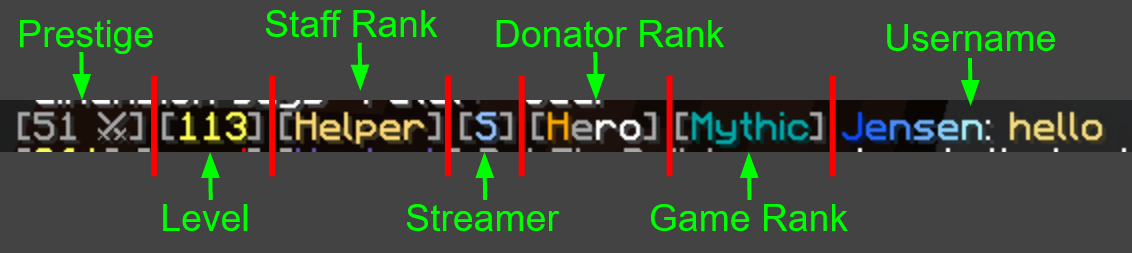
Breakdown of what's going on whenever someone says something
Game Rank
Game ranks are from /ranks and have a requirement of game time and cost money to advance. Advancing these ranks can give in-game rewards as well as access to more commands that can improve quality of life or make you look snazzy. Powerful rewards that you eventually get include more job slots, more backpack rows, more /tshop rows, extra /sethome slots, and one-off item payouts like bottles, crate keys, sell wands and spawners.
There are 27 ranks in the ladder and both requirements have to be met — the money is deducted from your balance when you rank up, and the time is your total playtime. The cheapest rank costs $1,000 and an hour played; the most expensive costs $4,000,000 and 240 hours. /rank shows your current rank and its perks, what the next one gives, and exactly how much time and money you still need. See Ranks for the full table.
Donor Ranks
Donator ranks are from actual money like USD, so they offer some very cool perks. Most of the perks are actually acquirable from /ranks, so its a way to instantly acquire those perks. There are, however, a few perks to donator ranks that aren't acquirable from /ranks such as an XP multiplier which can be extremely powerful.
Staff Ranks
Staff ranks don't grant any in-game advantages to staff members. Their abilities from staff ranks are used purely to help out the good players of Teldaria, and abuse is not tolerated. Staff are volunteers that donate their time to help out players, so if you need any help or have any questions you know who to go to!
Frequently Asked Questions
Why can't I use a shield?
Shields are disabled. It would be too strong as it can negate the damage from the highest of tiers.
Can I use vanilla armor?
Vanilla armor is disabled. Only tiered, custom armor can be worn as it the only useful form of armor. Elytras, however, can still be used.
What are the gear tiers, in order?
Twelve of them, weakest to strongest: Regular, Plain, Sturdy, Forgotten, Ghostly, Tormented, Hellish, Fatal, Legendary, Heavenly, Transcendent, Mythic. Essence, cloudy bottles and repair prices all follow the same ladder, and /tiers prints it in game.
What is a Vote Party?
Every 100 votes (counts from everyone), a Vote Party will occur — every player who voted in the last 24 hours receives $1,000, 5 Tokens and a Common Crate Key. Remember to do /vote, to make vote parties happen faster!
Why does it say I've already joined too many jobs?
Every new player starts with the Hunter job joined, and since you only start with one job slot, you can't join any more. If you do want to join another job that is not Hunter, you would have to leave with /jobs leave hunter (which costs you 30% of your Hunter level) or unlock a new job slot with /ranks.
What does luck do?
Luck increases how many custom materials you get when a mob drops one, like Brains, Tusks and Blood Vials. It does not affect custom item drops such as tiered gear or Magic Dust.